Is HappyMod Safe? Full Verification, Malware Risks & Legal Guide
Not every HappyMod APK is a virus, but that does not mean that every HappyMod APK file can be labelled safe. The questions that arise are about HappyMod’s safety and the security of mod files installed from the HappyMod APK. The point to note here is that HappyMod and the mods listed on HappyMod are not the same thing.
The Important Distinction
HappyMod itself comes clean and is scanned by various safety tools all over the internet. Make sure you download from a trusted source like happymodworld.com . The real problem arises in the mods available in it. The uploaded mod files that are handed out are actually altered, re-packaged, or built with different code.
What is HappyMod APK
A lot of apps and games are fun to use but carry limited resources for free users. HappyMod brings premium unlocked versions of these paid games to its users for free. Users get the ultimate access to paid features without spending anything. It covers a wide range of games available on the Google Play Store; this is why it’s also described as a third-party Play Store. There is a large community behind it that updates mods regularly and troubleshoots any errors.
HappyMod APK offers modded versions of apps and games that come with unlimited resources, offering adventurous access to the latest game updates. It carries older as well as the latest versions of any app or game. It is a distribution tool; installing it won’t install any mod.
How HappyMod’s Modded Files Are Actually Made
A modded APK is created by altering the existing app, not building the entire app from scratch. The process is done by following the procedure of unpacking the existing code of the official app and then revising the code. The explanation of revising means that the builder removes a license check, unlocks premium features, and injects unlimited currency. After all this, the last step is repackaging the entire code, and here comes the mod.
The final step is an important detail that android wants apps to be digitally signed before installation. When an APK is modified, it loses the signature of its official developer. Then the new builder has to re-sign the modded app with a new certificate because the original developer’s signature no longer matches.
Key Features HappyMod Promotes
HappyMod carries a large mod library in itself. All the mods available in the APK are actually uploaded by the community, not the official developer. Users get multiple versions of the same mod to ensure device compatibility. Users can also request any changes in the mod as they want.
The app also has a built-in search bar that helps users search for the desired mod instead of finding it randomly in the app. Every mod file available has a user review and rating system, from which newcomers can get an idea of working of mod by other point of view.
Is HappyMod Safe? The Quick Answer
There are two categories in which the security concerns regarding HappyMod fall: number one, HappyMod itself, and number two, mod files available on HappyMod. I, as a Security & QA Analyst, will explain both of these categories. So the answer to the first question is YES: HappyMod itself as an app is safe if downloaded from a secure website like happymodworld.com. But that doesn’t mean that every HappyMod file can be labelled as safe and secure other than on happymodworld.com.
HappyMod APK is a distribution platform; it hosts certain mod files that are altered and re-packaged. No doubt, the team itself checks the mods, but still, due to the vast number, any malicious file might slip in and get installed on your device. Make sure you turn on Google Play Protect and also ensure the security check of any specific app file you installed. Tools like VirusTotal, ReversingLabs, and Meta Defender Cloud often prove helpful for scanning.
Another security concern regarding happymid is data collection. As explained on the homepage, account creation is not mandatory to use happymod, so there shouldn’t be any doubt about stealing any personal information. But one thing to keep in mind is that any app requiring personal information installed from HappyMod is not affiliated with HappyMod APK or happymodworld.com. So ensure that you don’t share any of your sensitive data with any third-party app.
Are the Mods on HappyMod’s Catalog Safe?
Not every HappyMod mod should be considered equally safe. Each APK is a modified version of an original app, so its safety depends on what was changed inside that particular file.
A high “Working %” or green tag does not mean an APK is safe. It mainly shows that users report the mod as functional. A mod can work correctly while still containing unwanted changes or excessive permissions.
Another concern is dynamic code loading, where an app can download or load additional code after installation. This means even a clean scan should be treated as one security check, not a permanent guarantee.
Some risky mods may also display fake login screens designed to capture Google, Facebook, or gaming credentials. Unexpected login requests should always be treated carefully.
Battery drain, overheating, or unusual background activity can also be warning signs, although they do not automatically prove malware. Finally, compare the APK’s permissions with its actual purpose. An offline game, for example, has little reason to request contacts, SMS, microphone, or accessibility access.
The key takeaway is simple: “Working” does not mean “safe.” Evaluate the individual APK, its permissions, behavior, and source rather than relying on one green label or rating.
How to Vet a HappyMod APK Before Installing (Step-by-Step)
Along with checking the performance and ratings of the file, safeguard your device and also protect your personal information. If you confirm these security checks on a website, as you see on happymodworld.com, that website can be trusted.
Scan the APK on VirusTotal
Upload the file to VirusTotal and let it scan. VirusTotal is one of the tools that people and users trust. It will simply detect any malicious errors found in the file. Happymodworld.com provides you with a file that is already scanned by VirusTotal. So make sure you download from a safe website like happymodworld.
Check its permissions.
A modded doesnot need any personal information, so make sure you check the permissions it’s asking for. If the permissions include sensitive data, abandon the game. Also avoid extra information access such as contacts, sms or location for such modded apps. Happymod APK from happymodworld.com requires no login or signup to run.
Read recent comments.
See the latest ratings and reviews given by the users. These are actually the players who have tried the HappyMod APK or any mod from HappyMod APK. These comments will let you know if the APK file contains any viruses, malware, or bugs that need to be fixed before you install it.
Confirm the file type.
Android installs the app that is built in its own particular format, APK. Verify that you download an APK file, not an .exe, .dmg, or another unexpected file type.
Keep Google Play Protect enabled.
The main purpose of Google Play Protect is to provide an additional security layer by scanning apps, especially the apps that are installed from outside Google Play.
Can Using HappyMod Get Your Account Banned?
There is no specific answer for this, but yes, in certain cases you can get your account banned- not because HappyMod is a virus, but because if the game creators catch you cheating by using a mod, they can delete your account. Many apps and games have strict Terms of Service that prohibit the use of modified versions.
The account-ban risk is totally unrelated to malicious code. This risk is divided into three categories that are explained below.
Offline-only game:
These games have almost no risk of account ban. However, a modded version of any offline app can still have other security or compatibility issues.
Offline with Occasional Checks
These are the apps with moderate account ban risk. These are actually partially offline games, but they still check in with a server now and then. You might get caught on any check even though you are not playing against anyone.
Competitive online game:
This is where the real risk lies. Games like Roblox, PUBG, Free Fire, and most competitive online titles run server-authoritative systems. Unauthorized third-party software can directly affect gameplay and may violate the game’s rules and get you banned.
The practical rule: if a game has leaderboards, live multiplayer, or in-app purchases tied to an account, treat it as Tier 3
The key point is that HappyMod itself does not determine whether you will be banned. The game’s developer or publisher sets the rules. Before using a mod with an online account, check that game’s current Terms of Service and anti-cheat policy rather than assuming that a popular mod is allowed.
Is HappyMod Safe on a Rooted Device?
Rooted phones take the game to higher risks. This is because a rooted Android device has no built-in walls between apps or simply removes a layer of Android’s built-in sandboxing. This allows a repackaged app access to other apps’ data.
Rooting does not make happymod itself dangerous, but it gives other malicious apps more room to act. A rooted device gives you more control, but it also reduces some of Android’s built-in safety barriers. Be significantly more cautious with third-party modded APKs on such devices.
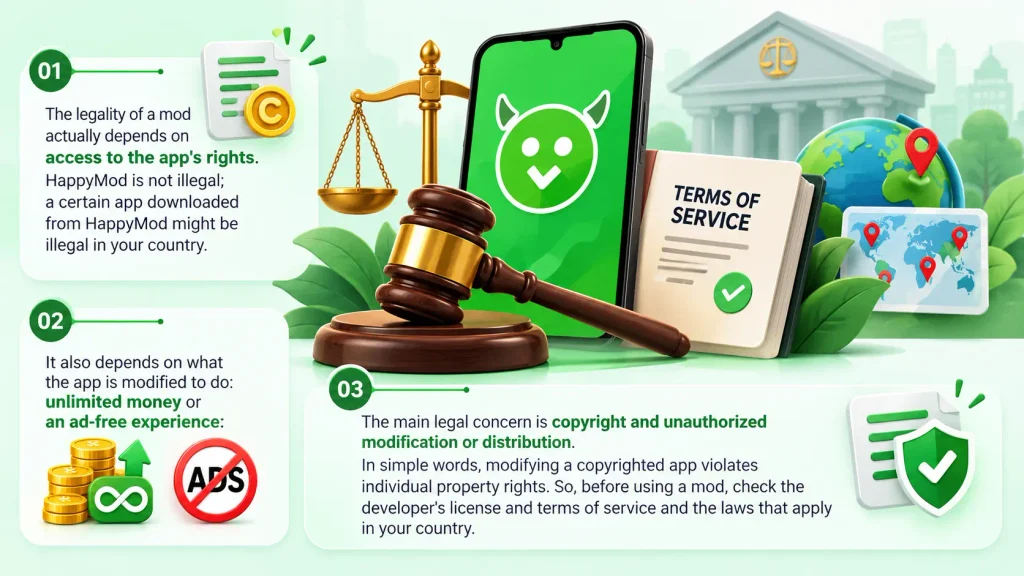
Is HappyMod Legal to Use?
Is HappyMod Safe for iPhone / iOS?
There is no verified official HappyMod app for iPhone or iPad. HappyMod is built around Android APKs, and APK files cannot be installed directly on iOS. Websites using terms such as “HappyMod iOS” or “HappyMod IPA” may be referring to unofficial methods rather than an official iOS release. Your device should therefore be treated carefully when a third-party website asks you to install a configuration profile, re-signed app, or other file while presenting it as “HappyMod for iPhone.” Your existing guide explains these methods, their limitations, and the differences between them in detail.
For the complete explanation, including HappyMod iOS methods, configuration profiles, jailbreak limitations, copycat apps, and the PC emulator approach, read our complete HappyMod iOS guide.
The key takeaway is simple: do not assume that a “HappyMod iOS” download is an official HappyMod release just because it uses the HappyMod name.
Is HappyMod Safe for Specific Games & Devices?
HappyMod safety depends on the specific game and the device being used. Using mods for online games such as roblox or free fire may result in account restriction. For kids and students, extra caution makes sense because a modded app may expose them to unwanted permissions, misleading content, or account-related risks.
Game-by-Game Safety Comparison
| Game | Risk Tier (from the ban section) | What to Know |
|---|---|---|
|
Toca Boca
|
Tier 1-2 | Mostly offline, so a mod that unlocks paid locations rarely touches a server. The main risk is a bad file, so run the vetting steps. |
|
Roblox
|
Tier 3 | Roblox runs on its servers, so a mod on your phone can’t add Robux or items to your account. |
|
Free Fire
|
Tier 3 | Garena’s anti-cheat checks the client against its servers, and detection usually means a permanent ban. |